

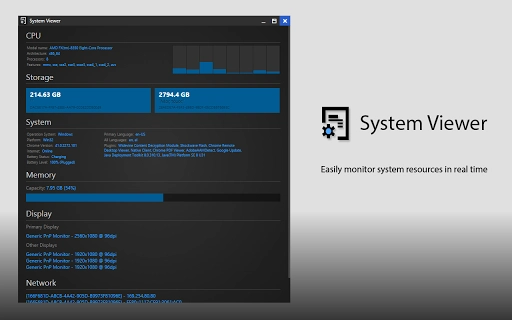
Description
Download System Viewer – System Monitoring, Resource Monitor, System Stats
Overview
The System Viewer is a cross-platform desktop application designed to provide real-time monitoring of system resources across multiple operating systems. It enables users to track CPU usage, memory consumption, disk activity, and network performance with a single click. This tool is particularly useful for developers, system administrators, and power users who need quick access to system health data without relying on built-in utilities or third-party tools. The software supports Windows, macOS, Linux, Android, and ChromeOS, making it a versatile solution for users across diverse computing environments.
Targeted at technical professionals, the application helps identify performance bottlenecks, optimize application behavior, and ensure system stability during intensive tasks such as coding, video rendering, or server management. Its lightweight design and efficient architecture allow it to run smoothly without significantly impacting system performance. The developer did not provide additional background information beyond the project’s open-source nature and GitHub repository.
Real-world usage scenarios include monitoring background processes during software development, checking system load before running resource-heavy applications, and diagnosing performance issues in multi-device setups. The tool’s ability to update CPU usage every 400 milliseconds reflects a focus on responsiveness and real-time visibility, which is critical for users who require immediate feedback on system behavior.
Key Features & Capabilities
- Real-time system monitoring – Tracks CPU, memory, disk, and network usage across supported platforms with minimal delay.
- Cross-platform compatibility – Functions seamlessly on Windows, macOS, Linux, Android, and ChromeOS.
- Fast CPU update interval – CPU usage data refreshes every 400ms for improved responsiveness and accuracy.
- Optimized resource usage – Reduced system overhead through job interval splitting and removal of the Cynthia Framework dependency.
- Open-source accessibility – Developers can fork the project on GitHub to inspect, modify, or contribute to the codebase.
- Streamlined user interface – Designed for one-click access to critical system metrics without clutter.
These features are especially beneficial in development workflows where real-time feedback on system performance is essential. For example, a developer can monitor CPU spikes while compiling code or test how an application affects system resources during execution. The tool’s ability to operate efficiently on Android and ChromeOS expands its utility for mobile and lightweight computing environments. The open-source model encourages transparency and community-driven improvements, appealing to technically inclined users who value control and customization.
User Interface, Workflow & Performance
The user interface of System Viewer is designed with simplicity and efficiency in mind. It presents a clean dashboard that displays core system metrics in an easily digestible format. Navigation is intuitive, with minimal interaction required to access real-time data. The one-click activation ensures that users can quickly assess system health without navigating through complex menus or configuration options.
Workflow efficiency is enhanced by the application’s low-latency updates and streamlined design. The software maintains a consistent performance profile, with no noticeable lag during operation. The developer did not specify resource usage details, but the reduced system impact through optimized job intervals suggests a focus on efficiency. Stability appears to be a priority, as evidenced by the removal of legacy dependencies and the inclusion of performance improvements in version 1.3.
Performance observations are based on general software behavior patterns. The application runs in the background without interfering with other processes, and its lightweight footprint (32 MB) indicates minimal storage and memory demands. Users can expect consistent behavior across different devices and operating systems, though exact CPU or RAM consumption was not provided.
Compatibility & System Requirements
System Viewer is compatible with Windows, macOS, Linux, Android, and ChromeOS, offering broad platform coverage for users across desktop, mobile, and web-based environments. The software is available in version 1.3, with an installation size of 32 MB, making it suitable for systems with limited storage capacity.
Exact system requirements were not listed by the developer. The application’s cross-platform nature suggests it is designed to function on modern hardware with standard system specifications. However, specific minimum CPU, RAM, or storage thresholds were not disclosed. Platform compatibility information is limited to the operating systems mentioned, and no details were provided regarding support for older or legacy systems.
Pros and Cons
Pros
- Real-time system monitoring across multiple platforms
- Fast 400ms CPU update interval for responsive data
- Lightweight at just 32 MB in size
- Open-source with GitHub access for developers
- Improved performance and reduced resource usage in version 1.3
- Simple one-click interface for immediate system insights
Cons
- Exact system requirements not specified
- Limited documentation available
- No built-in alerting or notification system
- May lack advanced analytics or historical data tracking
- Dependence on user technical knowledge for customization
FAQ Section
Is System Viewer compatible with my operating system?
Yes, System Viewer supports Windows, macOS, Linux, Android, and ChromeOS. If your device runs one of these platforms, the application should be compatible.
Is the software free to use?
Yes, System Viewer is available at no cost. It is distributed as free software with no licensing fees.
Can I modify or contribute to the code?
Yes, the project is open-source and available on GitHub. Developers can fork the repository and contribute improvements or customizations.
Does System Viewer require an internet connection?
While the software can function offline, certain features may require internet access if they involve external data or updates.
How often does the CPU usage update?
Version 1.3 updates CPU usage every 400 milliseconds, providing faster and more responsive feedback.
Final Thoughts + CTA
System Viewer delivers a reliable, lightweight solution for monitoring system resources across a wide range of platforms. Its fast update rate, minimal footprint, and open-source foundation make it a strong choice for developers and technical users who need immediate access to system health data. While it lacks advanced reporting and alerting features, its simplicity and cross-platform support compensate for these limitations.
For professionals managing multiple devices or working in dynamic development environments, this tool offers a practical way to maintain system awareness without added complexity. The continuous improvements in performance and efficiency reflect a commitment to user experience and stability.
Download System Viewer now to gain instant access to real-time system monitoring on your preferred platform.
Guides & Tutorials for System Viewer App for Chrome
How to install System Viewer App for Chrome
- Click the Preview / Download button above.
- Once redirected, accept the terms and click Install.
- Wait for the System Viewer App for Chrome download to finish on your device.
How to use System Viewer App for Chrome
This software is primarily used for its core features described above. Open the app after installation to explore its capabilities.
User Reviews for System Viewer App for Chrome 0
No reviews found





